
Mac Storage Cleaner That Finds What’s Eating Your Disk
Free up space on your Mac the smart way. MacSentinel scans the whole startup disk with direct APFS traversal, renders an interactive storage treemap you can zoom into, and surfaces the orphaned caches, Xcode DerivedData, Docker leftovers, and simulators hiding the real culprit — then lets you clean them surgically.
No background daemons. No auto-deletions. You stay in control.
Why Is My Mac Storage Full?
If you want to free up space on Mac and keep getting surprised by a full startup disk, you’re almost never looking at your own files. macOS hides a graveyard of junk that accumulates over years:
- Orphaned caches & containers from apps you deleted long ago
- Xcode DerivedData that regenerates every build — often 10–40 GB
- Docker backing stores that keep growing after you remove containers
- iOS simulator runtimes, logs, and downloaded update installers
- Local Time Machine snapshots and corrupted cache files
Mac Disk Space Analysis, Visualized
Instead of guessing, MacSentinel performs deep mac disk space analysis on your volume and renders a color-coded storage treemap. Zoom from the whole startup disk down to a single folder, and instantly spot the largest files that are really taking up space.
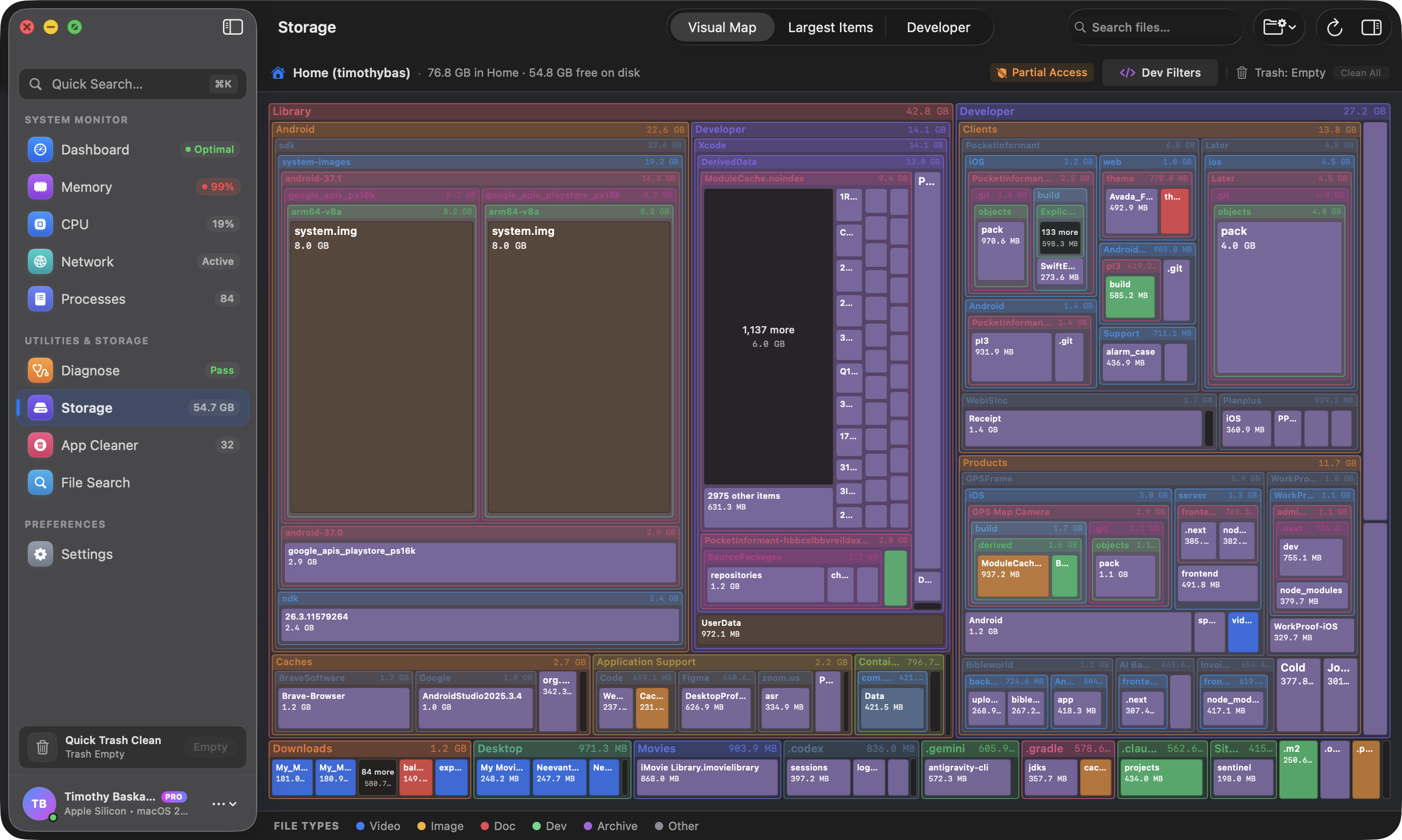
What MacSentinel Finds & Cleans
A real mac storage manager for cleanup, not a one-click “optimizer” that empties your caches blindly. MacSentinel tells you exactly what each item is worth in gigabytes — then lets you decide.
Xcode DerivedData
Rebuildable build artifacts that quietly eat gigabytes. Clear them in one click — Xcode regenerates everything on your next build.
Docker leftovers
Dangling images, orphaned volumes, and the ever-growing backing store that survives container removal.
~/Library caches
Orphaned caches and containers left behind by apps you already uninstalled, still taking up space in the shadows.
Orphaned app leftovers
Leftover application support and container data from apps that are gone — junk that no cleaner usually touches.
Simulator runtimes
Outdated iOS/watchOS simulator runtimes and app data inflating your disk. Keep only what you actually use.
Largest files & folders
An interactive treemap zoom of the whole volume so nothing is invisible — find what's really taking up space fast.
Clean Up Mac Storage Without the Risk
Most “clean my mac” tools install background daemons, watch your disk 24/7, and auto-delete files the moment you look away. MacSentinel is different — it’s a native Swift utility with zero background daemons.
- Scans only when you ask it to
- Never runs in your menu bar
- Nothing is deleted without your explicit, informed click
- Every cleanup shows the size and location before committing
Safe, surgicall cleanup
APFS direct traversal
Treemap zoom
Native Swift speed
Mac Storage Cleaner FAQ
Why is my Mac storage full even though I barely use it?
The biggest hidden space hogs on a Mac are orphaned ~/Library caches and containers left behind by uninstalled apps, Xcode DerivedData, Docker virtual disks that keep growing, iOS simulator runtimes, and log files. Together these can quietly consume tens of gigabytes of your startup disk without showing up as visible apps or files.
How do I find what's taking up space on my Mac?
MacSentinel renders an interactive storage treemap of your startup disk using direct APFS traversal, so you can zoom into any folder and instantly see the largest files and folders. It also flags orphaned caches and containers, Xcode DerivedData, Docker leftovers, and simulator runtimes so nothing hides from view.
Is it safe to delete Xcode DerivedData to free up space?
Yes. Xcode DerivedData is regenerated automatically the next time you build your project, so deleting it is one of the safest and most effective ways to reclaim gigabytes. MacSentinel shows you exactly how much space your DerivedData occupies and lets you clear it in one click.
How does MacSentinel clean up Docker space on a Mac?
Docker's backing store can balloon in size even after containers are removed. MacSentinel locates leftover Docker data, dangling images, and orphaned volumes, reports exactly how much they consume, and lets you surgically clean them — all without forcing a full disk prune.
Does MacSentinel run in the background like other clean-my-mac tools?
No. MacSentinel has zero background daemons. It scans only when you ask it to, never sits in your menu bar, and never auto-deletes anything. MacSentinel is a lightweight native Swift utility that leaves no agent running on your machine.
Stop Wondering What’s Taking Up Space
Download MacSentinel, scan your startup disk once, and reclaim gigabytes of mac storage in minutes.